A place for your business
to take shape.
Start with what you do. Turn it into a website people can understand, explore and use. Keep the information and the presentation connected as things change.
View sample websiteBusiness information
The facts you want to share.
Content & design
A clear shape for those facts.
Review & publish
A deliberate public version.
Customer requests
A useful next conversation.
Use your words.
Or your hands.
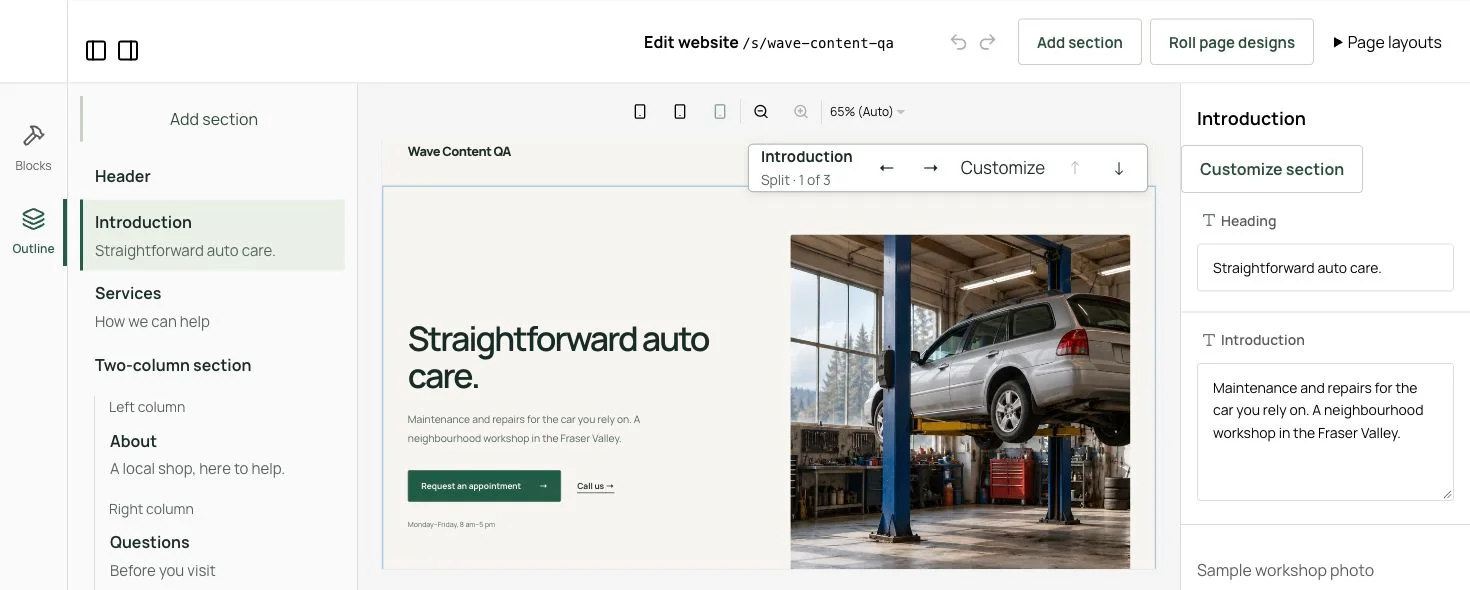
Arrange sections visually. Change headings, copy and images. Choose designs, refine layouts and preview the result.
When it’s easier to describe a change, ask the assistant. See the proposed edits together, review the details, and approve the version you want to publish.
Save your own sections and layouts for reuse. Invite collaborators and give each person the access they need to edit, design or publish.
Same idea.
A different feeling.
Try a layout and palette for this design illustration.
See how the same content takes on a different character.
Editorial layout · Paper palette
Made slowly. Used often.
Good things
for ordinary days.
Thoughtful objects, small workshops, and a place to make something with your hands.
A fictional creative studioGood content
has a clear shape.
A service has details. An article has a date. A workshop has a description. Give recurring information its own content type instead of rebuilding each page from scratch.
Choose the fields that matter, organize entries with your own classifications, and publish listing and detail pages from shared templates. Visitors can filter a collection to find what interests them.
Clay, from the beginning
Workshop · Introduction
A slower Saturday
Workshop · Open studio
The shape of a good cup
Workshop · Ceramics
Illustrative workshop collection.
Leave room for
a real conversation.
Inquiries & appointment requests
Visitors can send a request for you to review in Studio. Appointment requests need confirmation from the business.
Visitor assistance
Help visitors find answers from your published business information and prepare a request. Private drafts and customer requests stay separate.
Connected assistants
Connect a compatible assistant to work on your site from a conversation. You choose its access, with supported reviews kept inside the connected client.
A foundation you can build on.
Start with a website you can keep current. Our vision extends that foundation with independent designs, add-ons, commerce and booking.
Current capabilities and what comes nextA website is a beginning.
Make it useful.
Make the next useful change in Studio, or explore a sample website.